For managed service providers
The technician keeps the customer. The account manager keeps the contract.
FirstPass gives your service desk practice on the calls that decide renewals, reads Autotask or ConnectWise before every client meeting, and shows you which clients are drifting.
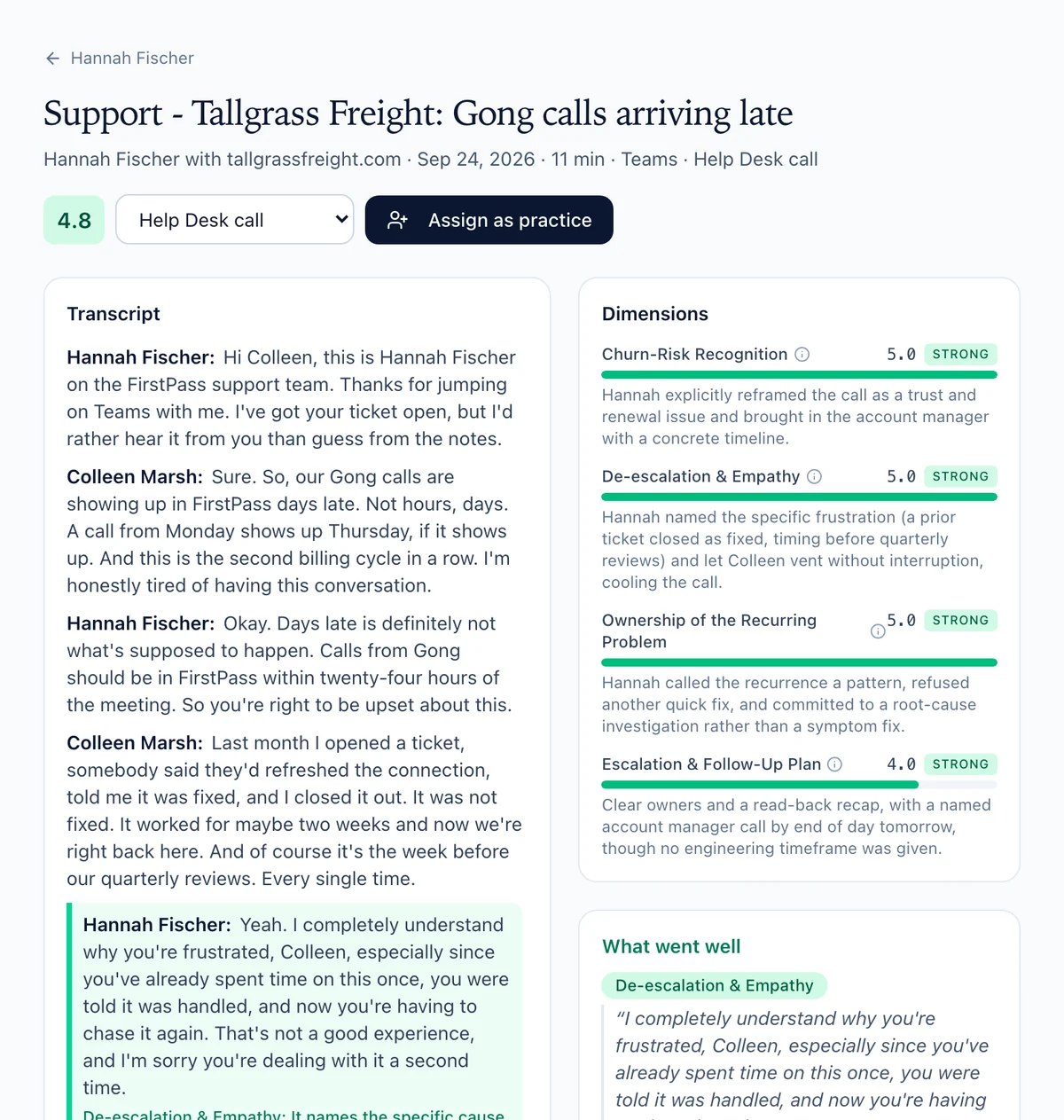
app.myfirstpass.com/live-calls
A support call from our demo team, scored on the Help Desk rubric: the customer’s second billing cycle with the same fault.
One platform, three people
The technician, the account manager, and the owner.
A repeat problem touches more than one person, and so does a renewal. Each gets the part of FirstPass that fits their job.
For technicians
Hired for technical skill. Judged on the phone.
The customer doesn’t remember the fix. They remember that nobody owned it, that they had to explain it again, and that “call us if it happens again” was the plan. Then they mention other providers, and the call becomes the renewal. Nobody practices those calls, because until now there was nowhere to.
What FirstPass gives your service desk
✓
Help Desk practice calls: the customer calls in, speaks first, and the problem is usually one that keeps coming back
✓
Customers built from your services and the problems your team actually sees
✓
Scored on a rubric made for support calls, not a sales rubric with the words changed
✓
Skill builders you create, or My Coach suggests, for single moments, like owning the repeat problem or hearing the renewal risk
✓
Text or voice, on the web and on the phone, any time between tickets
✓
A low-stakes start: Game Mode’s customer service ladder, with no product knowledge needed
Every score says what the technician actually did.
The Help Desk rubric
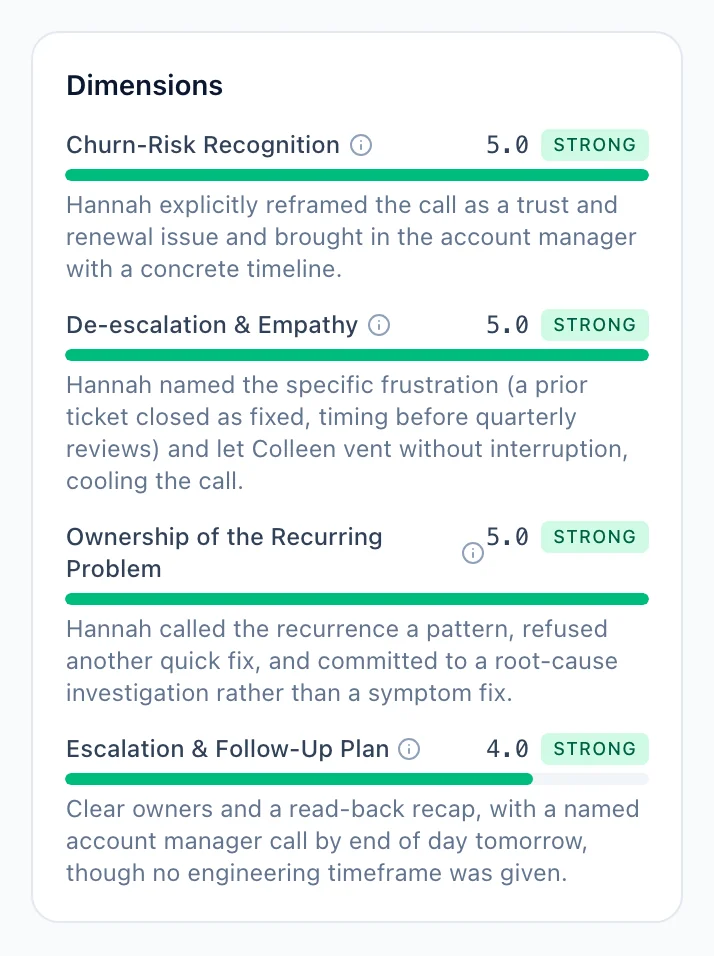
Six things a good support call does.
Every Help Desk call is scored 1–5 on these six dimensions, with what good looks like at each level. Nothing is being sold; the technician has to settle the customer as well as the problem.
De-escalation & Empathy
Names why the customer is frustrated, lets them finish, and takes responsibility without excuses.
“I completely understand why you’re frustrated, especially since you’ve already tried to get this resolved more than once.”
Ownership of the Recurring Problem
Says plainly that the issue keeps coming back, that it’s the company’s to solve, and aims at the cause, not another quick fix.
“Rather than fixing the symptom again, I want to find what’s making it come back.”
Business Impact Discovery
Asks how the problem affects the customer’s team and work, and uses the answer to set the urgency.
“Can you walk me through how this has been affecting your team?”
Escalation & Follow-Up Plan
Names who owns the fix, gives a timeframe for findings, and commits to a follow-up at a set time.
“Engineering owns this, you’ll have findings by Thursday, and I’ll call you myself at ten.”
Churn-Risk Recognition
Hears “maybe we should look at other providers” as a retention event, and says who will be brought in, and when.
“This is bigger than a ticket. Your account manager will call you before end of day.”
Technical Clarity
Says plainly what is known, what isn’t yet, and why earlier fixes didn’t hold, in words the customer can repeat to their own leadership.
“Here’s what we know, what we don’t yet, and why last month’s fix didn’t hold.”
Difficulty
Same problem. Three customers.
Pick how frustrated the customer is. The facts of the problem stay the same; their patience doesn’t.
EasyAnnoyed but reasonable
Frustrated the problem is back, but willing to give the technician a fair chance. Calms down when the history is acknowledged.
MediumFrustrated, patience thin
Judging whether this technician will be any different from the last. Accepts a next step only if it has an owner and a time.
HardAngry, close to leaving
Has heard “it’s fixed” before and is looking at other providers. Calms down only for real ownership and a concrete plan.
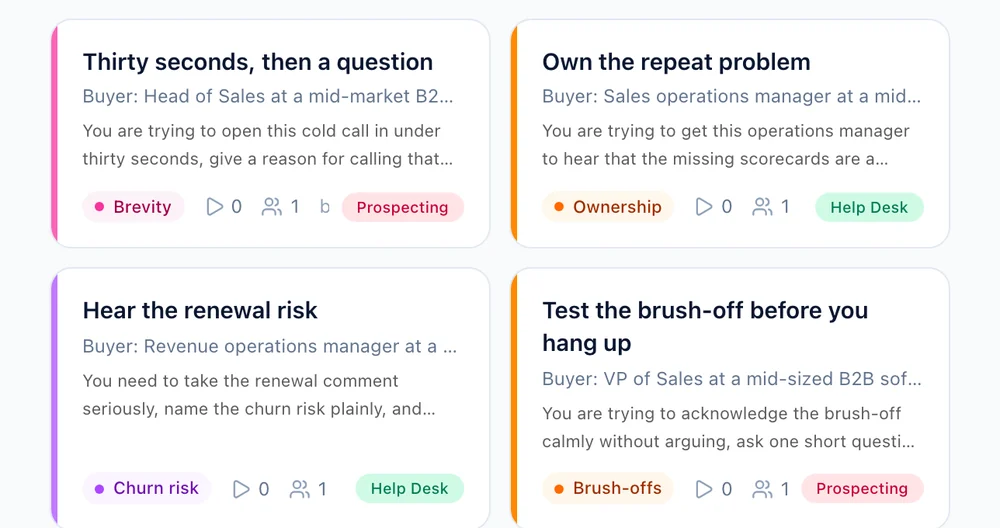
app.myfirstpass.com/skill-builders/library
Short drills for one moment at a time, tagged by call type. These are from our demo team.
For account managers
Walk into the QBR knowing what the help desk knows.
Connect your calendar and FirstPass picks out the client meetings. Brief one in a click: it reads your PSA and your CRM, starts from the last recorded call with that client, and builds a five-minute rehearsal for the moment that matters most. After the meeting, the debrief is waiting.
Your Autotask or ConnectWise PSA in every brief
Every brief for a client reads its service history beside your CRM: the agreement and when it renews, the tickets and what they’re about, satisfaction, devices and projects. The account manager stops hearing about the bad month from the client. Briefs only read from your PSA; the one thing FirstPass writes there is a ticket for a recommendation someone has confirmed, when your organization turns that on. FirstPass switches PSA on for your organization.
✓
The agreement: its type, when it started and when it renews, monthly recurring revenue, the SLA tier and block hours used
✓
Tickets in the last 90 days against the 90 before: open now, by priority, the most common issues, how many closed within SLA and the median time to resolve
✓
Up to five urgent tickets by title. Anything that looks like a password or code is removed before an AI model reads it, and PHI redaction applies too where your organization turns it on. Ticket notes are never read
✓
Satisfaction ratings, managed devices on unsupported operating systems or with warranties ending, open projects and which are late or over budget, and overdue invoices
✓
Matched to the client by the attendees’ email domains, the CRM account’s website or the company name. The rep can change the match
✓
Side by side with your CRM: an active agreement makes them a customer even without a won deal, and a former client gets a win-back brief
✓
Each PSA line in the brief cites the PSA, like every other source
✓
Reps see a client’s PSA data when they can see that account in the CRM, or, when it isn’t in the CRM, own the client in the PSA. An admin can open it to every rep
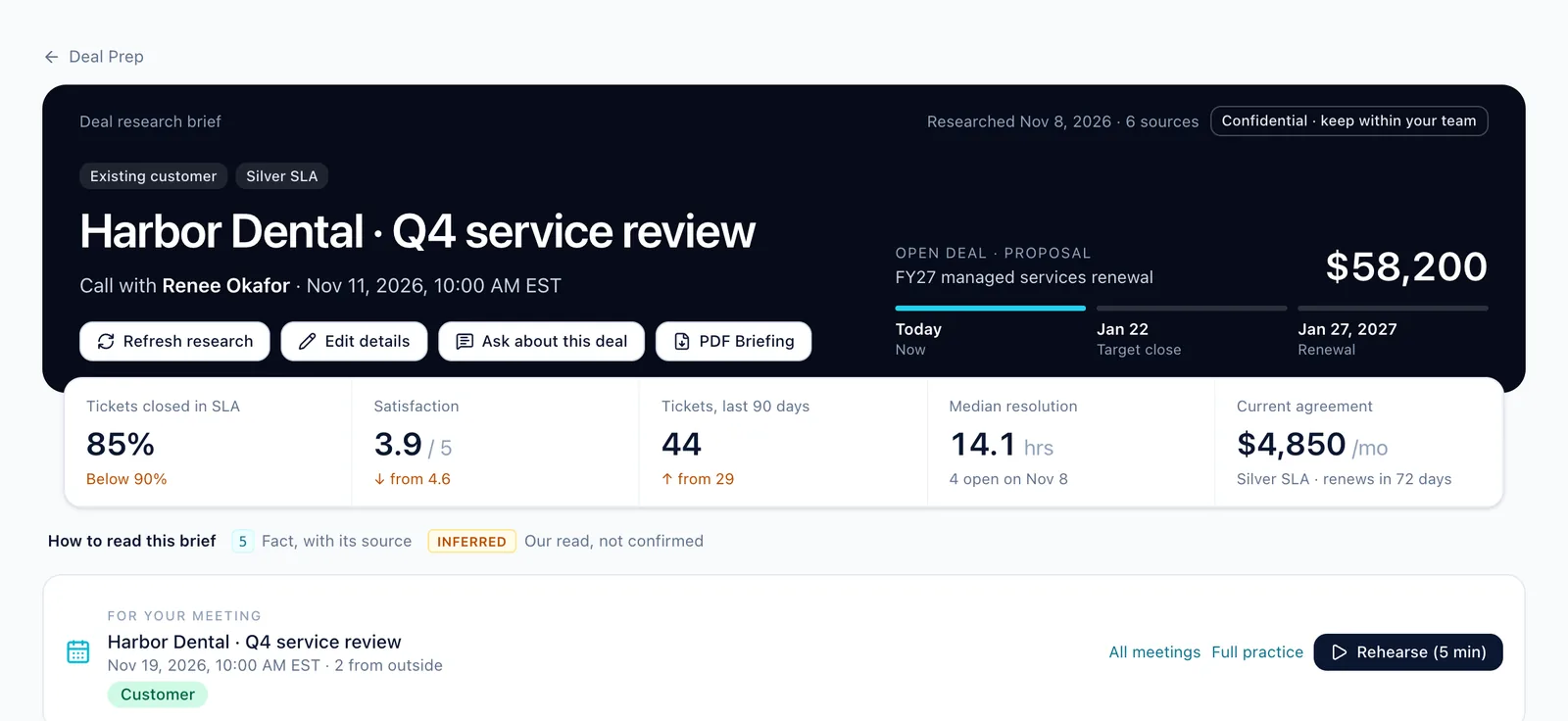
app.myfirstpass.com/calls/deal-prep/research
A QBR brief for a client of our demo MSP, read from its PSA. Each numbered line cites its source.
Get ready
The QBR deck writes itself.
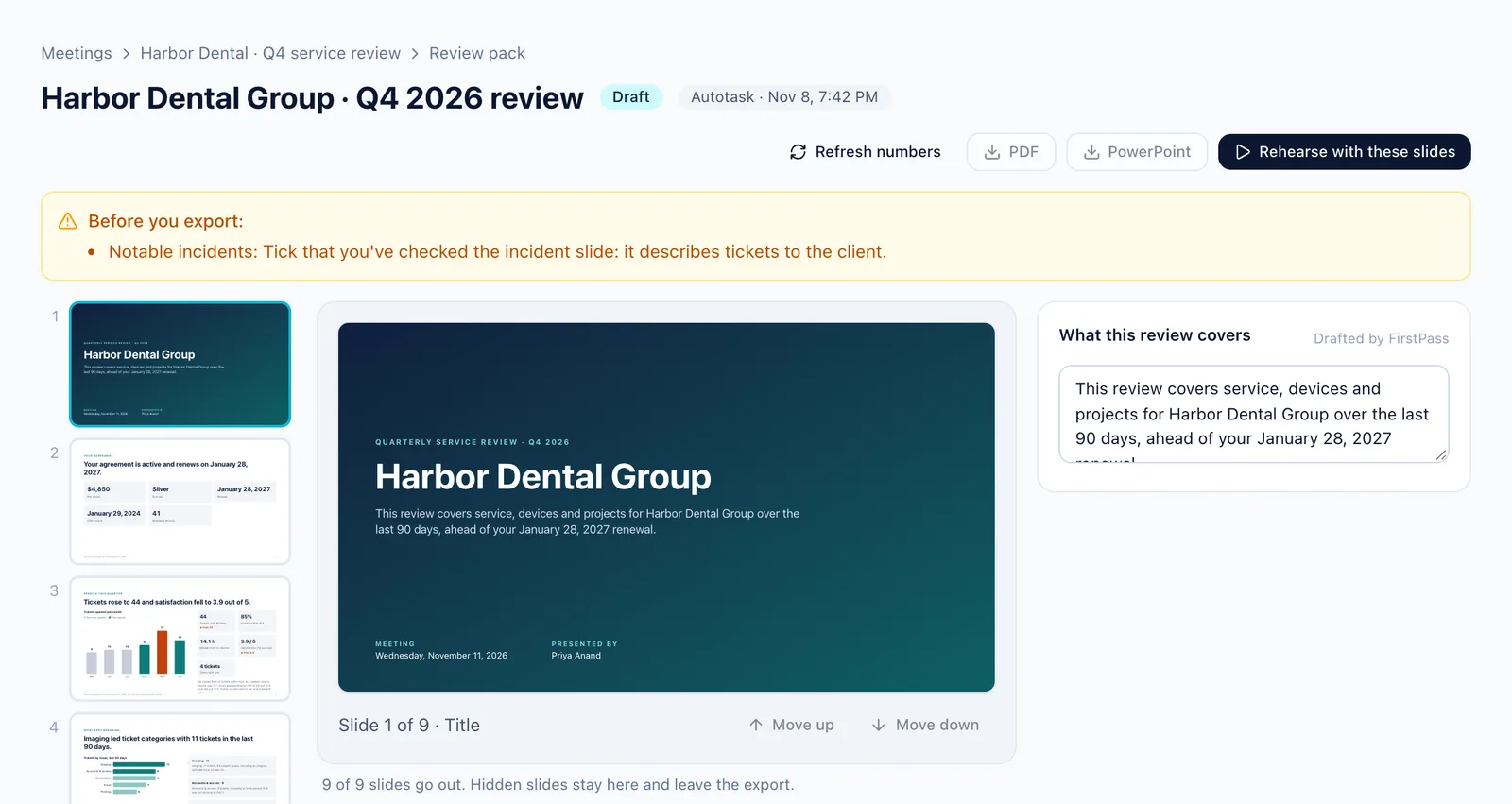
From the brief, FirstPass drafts what you need before you walk in. For a client on an active agreement, that includes the review deck, with every number read straight from the PSA. You check them and you send them; FirstPass never sends these for you.
✓
Account review pack: the agreement, the service you gave this quarter, what kept breaking, notable incidents, their environment, projects, recommendations and next steps
✓
Numbers on each slide come straight from the PSA and can’t be edited. Boxes marked
Needs you are what only you know
✓
Hide, show and reorder slides, then export to PowerPoint or PDF
✓
An agenda email for the client to read two days before, opened as a draft in your own mail
✓
A one-page call plan: your ask, what they’ll push back on, and the habit your own scored calls say to watch
✓
Rehearse with the slides: present the deck to a practice client in five minutes
How Get ready works →
app.myfirstpass.com/review-packs
A review pack for a client of our demo MSP.
Recommendations
A record of every risk the client chose to keep.
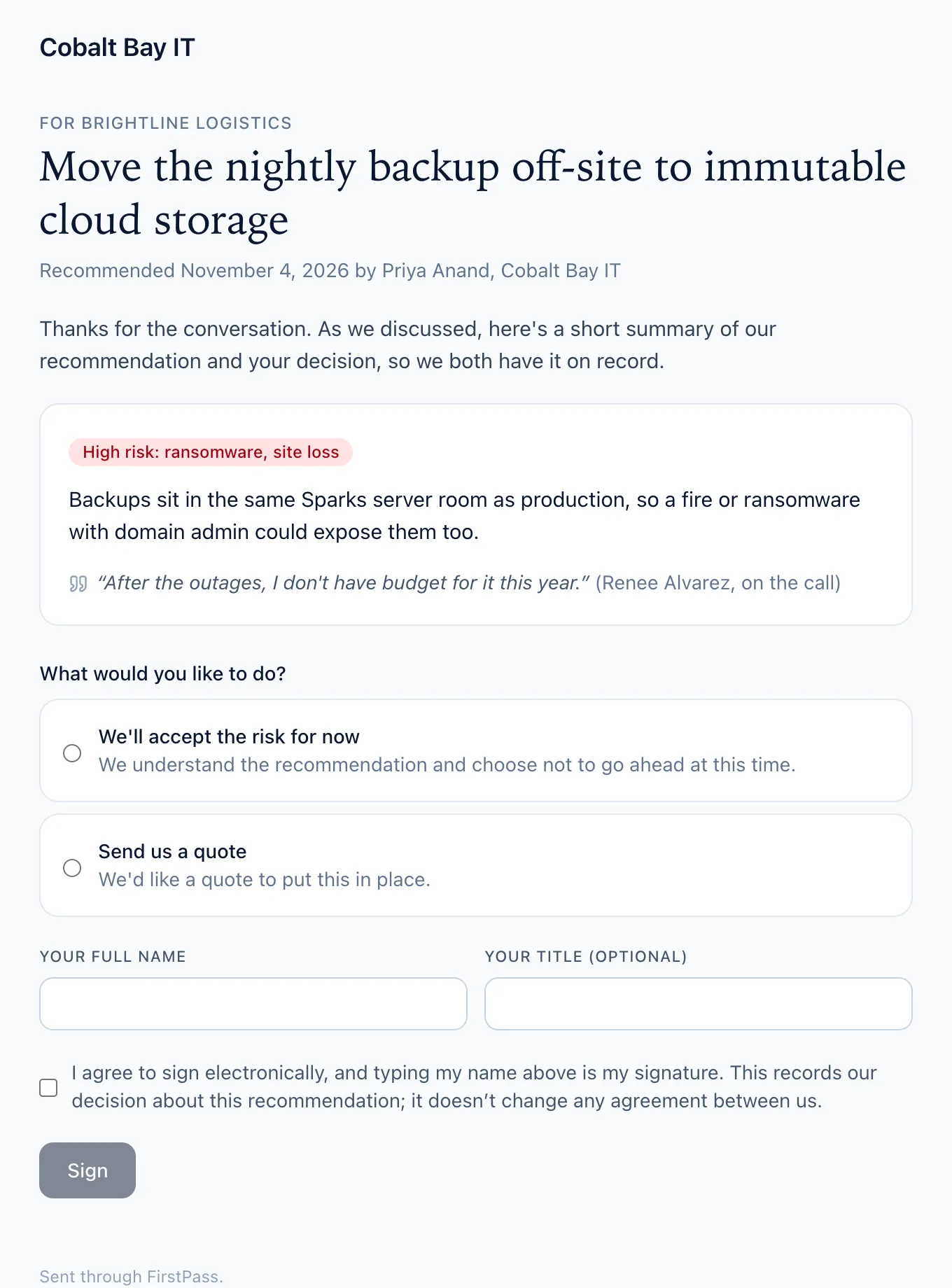
FirstPass finds the recommendations you made and the promises you gave on client calls. Nothing goes on the client’s record until a person confirms it. When a client declines a recommendation, they sign for it.
✓
Recommendations and promises from your recorded client calls, each with the words that were said
✓
Confirm a promise and open the ticket in your PSA in one click
✓
A declined recommendation goes to the client as a one-page form, on a link that needs no sign-in. They accept the risk for now or ask for a quote, and sign with their name
✓
The signed copy is a PDF emailed to both sides
✓
Each accepted risk comes up for review every 90 days, so the decision never goes stale
More about recommendations →
The page a client signs, from our demo MSP.
For the owner
See which clients are drifting before the renewal.
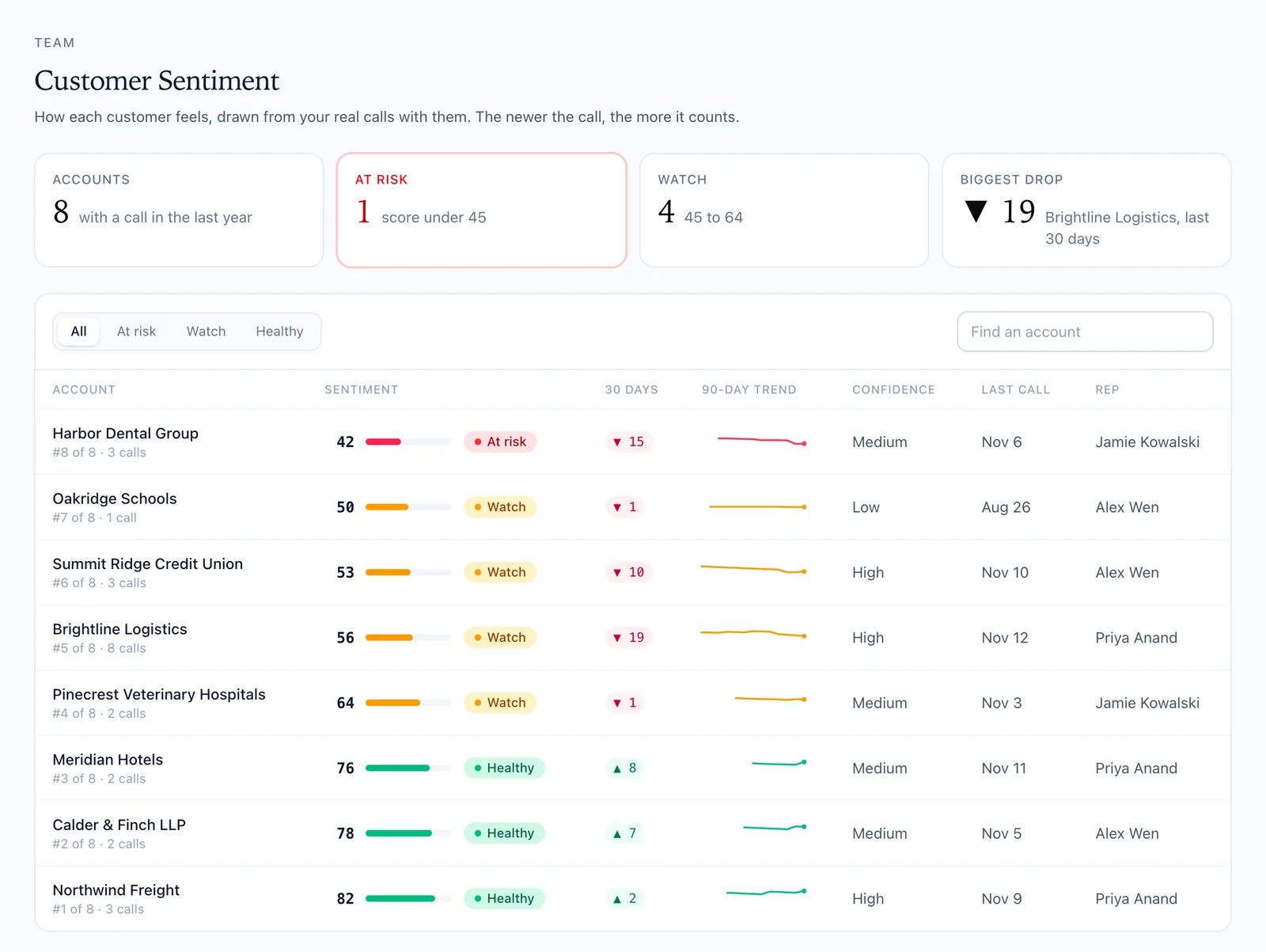
Import your team’s recorded client and support calls from Microsoft Teams, Zoom, Gong or Chorus. FirstPass scores them, reads how each client is feeling, and Team Coach reads the whole desk at once.
✓
Customer Sentiment: each client scored out of 100 from their recorded calls, with the newest calls counting most, and why it’s moving in the client’s own words
✓
Kept apart from your people’s scores: a hard client isn’t a bad call
✓
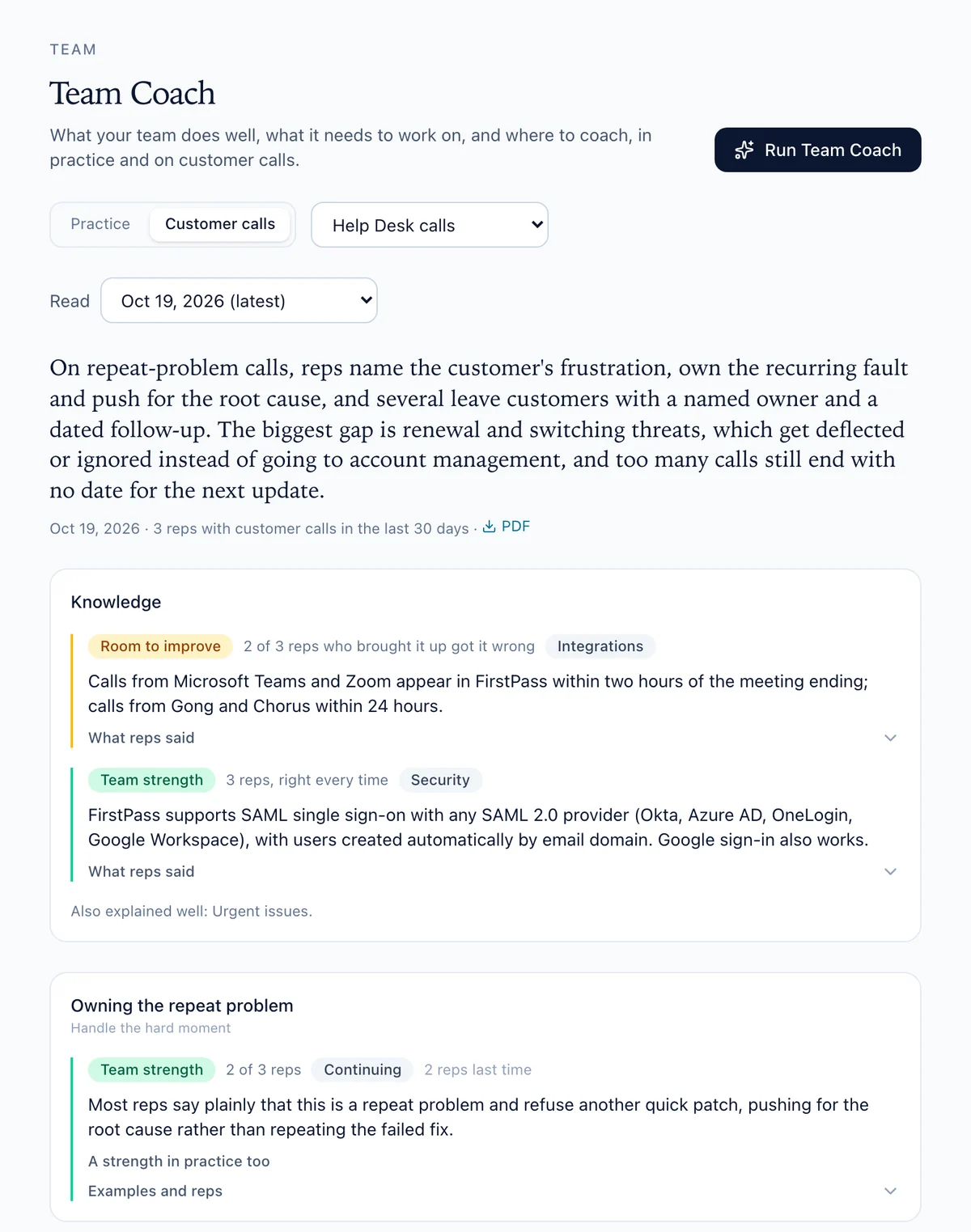
Team Coach reads your help desk team on its own: what it does well on repeat-problem calls, where it slips, and the skill builder to assign
✓
Facts checked: what technicians tell clients about your services, checked against your approved facts
✓
Live calls shows each person’s practice beside their real calls, dimension by dimension
✓
Impact shows whether a drill changed how their real calls go
How Customer Sentiment works →
app.myfirstpass.com/customers
Client accounts from our demo MSP, ranked by how their calls are going.
app.myfirstpass.com/dashboard/team/coach
Team Coach on a help desk team’s real calls, from our demo team.
Built around your service desk
Your technicians already fix the problem. Help them keep the client.
We’ll build a demo from your services, your most common repeat tickets, and the client meetings your team has coming up.
Get a demo →