Meetings

From the calendar invite to the follow-up email.

FirstPass picks out your customer meetings, briefs each one from your CRM, your PSA and the web, drafts the agenda and your call plan, lets you rehearse the moment that matters, and writes the debrief when the recorded call is scored.

Get a demo → See how it all fits →
  1. 1
    BriefYour calendar, your CRM, the client’s PSA record and the web, in one page.
  2. 2
    Get readyThe agenda email, your call plan and, for an MSP client, the review deck.
  3. 3
    DebriefWhat happened, what’s new on the deal, and the follow-up email, drafted.
  4. 4
    RecommendationsEvery recommendation and promise from the call, confirmed and tracked.
Meetings

Every customer meeting on your calendar, one click from a brief.

Reps connect their work calendar and FirstPass picks out the customer meetings. Brief one in a click: FirstPass reads your CRM first, looks at who’s coming and what happened on the last call, and builds the practice for the moment that matters most. The meeting is already on the calendar. Now the prep is too. Switched on per organization.
✓
Connect Microsoft 365 or Google Calendar, read-only. Only the rep sees their meetings: not their manager, not admins
✓
Customer meetings picked out: an open deal, a first meeting with a new company, a customer worth a brief. Internal meetings and short check-ins are left alone
✓
Matched to your CRM when your organization connects Salesforce, HubSpot or Dynamics 365, reading only the accounts and deals the rep owns or shares
✓
The brief reads your CRM first: the deal, its recent activity and the fields your admin chose, each line linked to where it came from
✓
Each brief is a Research a Deal run: the company’s website and recent news, and each attendee’s current role and background where your organization turns profile lookups on
✓
For MSPs, it also reads Autotask or ConnectWise PSA: the client’s agreement, tickets, devices and projects. More for MSPs
✓
Starts from your last recorded call with them, if there was one in the last 90 days: what happened, what’s new, and the action items still open
✓
Lands in your inbox when it’s ready, with the brief as a PDF if your organization wants one
✓
Checked again two hours before the meeting, unless your organization turns it off. You only hear about it if something changed
✓
Rehearse in five minutes: six turns on the moment that matters most, on the web or your phone
✓
Ask about this deal: answers from your brief, your CRM and your calls, each linked to its source
✓
On the phone too: today’s meetings, their briefs and the rehearsal, with a notification when a brief is ready
app.myfirstpass.com/meetings
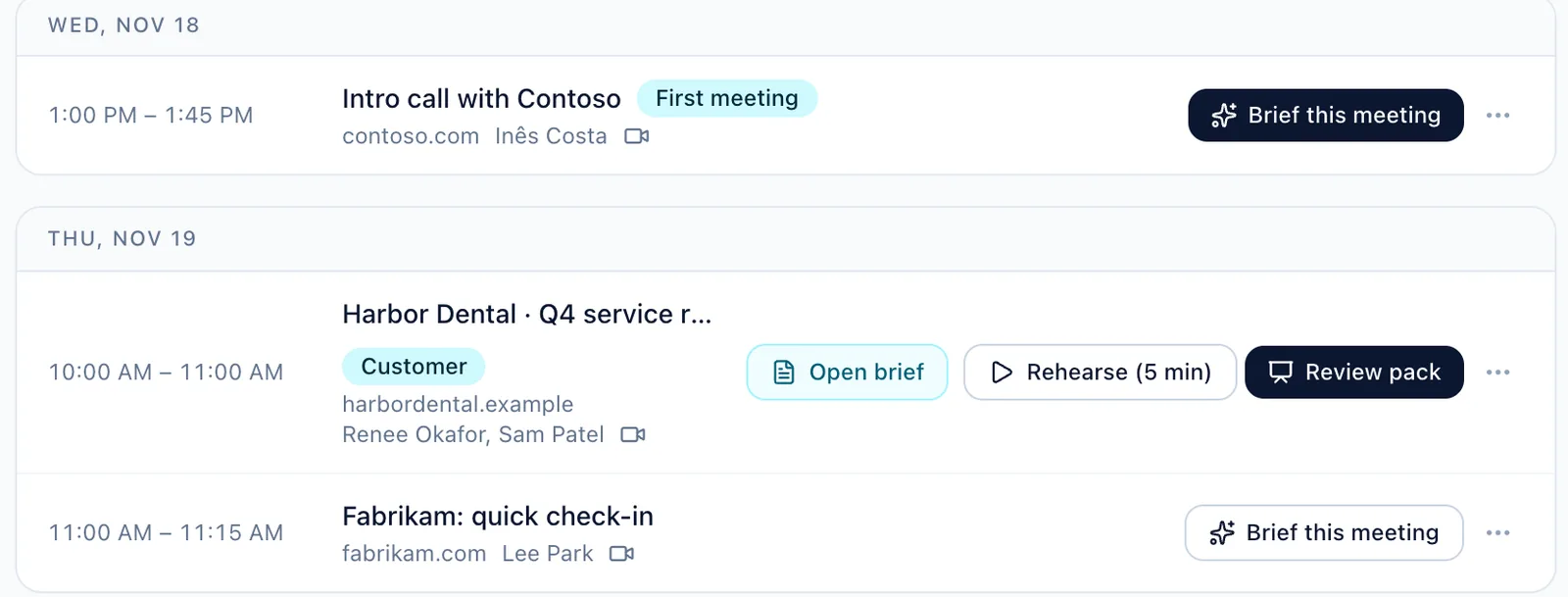
FirstPass Meetings page: the week’s customer meetings from the rep’s calendar, with a ready brief and a five-minute rehearsal for today’s quarterly review

A rep’s week from our demo MSP: customer meetings from their calendar, each one click from a brief.

Get ready

The brief is done. Now the meeting is ready too.

From a meeting’s brief, FirstPass drafts what you need before you walk in: the agenda email for the customer, a one-page plan for you, and, for an MSP client on an active agreement, the review deck. You check them and you send them; FirstPass never sends these for you.

Agenda email
Send it two days before

A short confirmation, a three-line agenda and a question or two for them to think about, addressed to the people from outside on the invite. Each agenda line shows where it came from: your brief, or the open items from your last debrief with them.

Edit it, then open it as a draft in your mail.

Call plan
One page for you, before and during the call

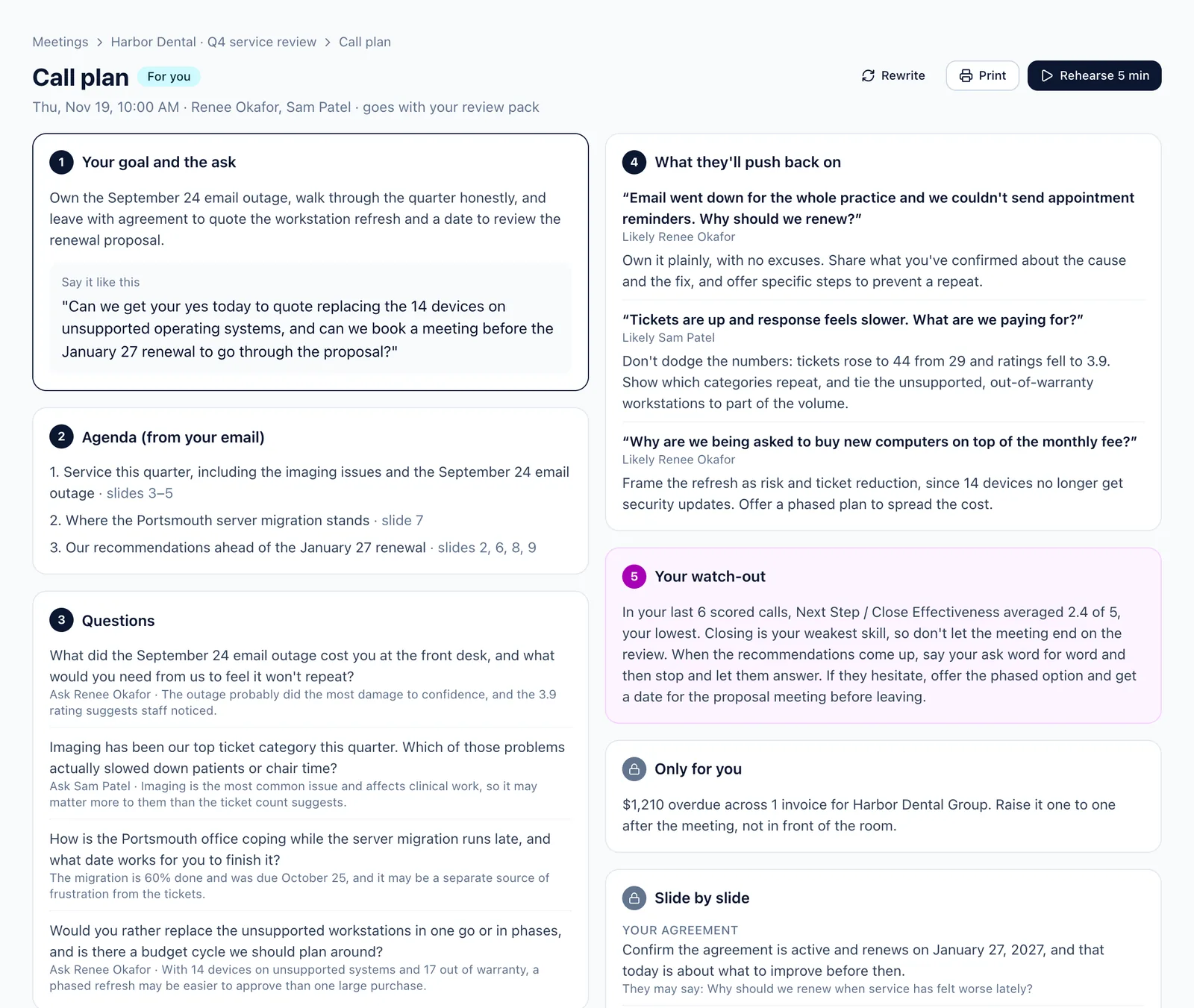
Your goal and the ask, with words you can use. The agenda, the questions to ask, what they’ll push back on and how to answer. Your watch-out, from your own scored calls. And what must stay out of the room.

Written with the agenda, so the two match.

Account review pack
The QBR deck, drafted from your PSA

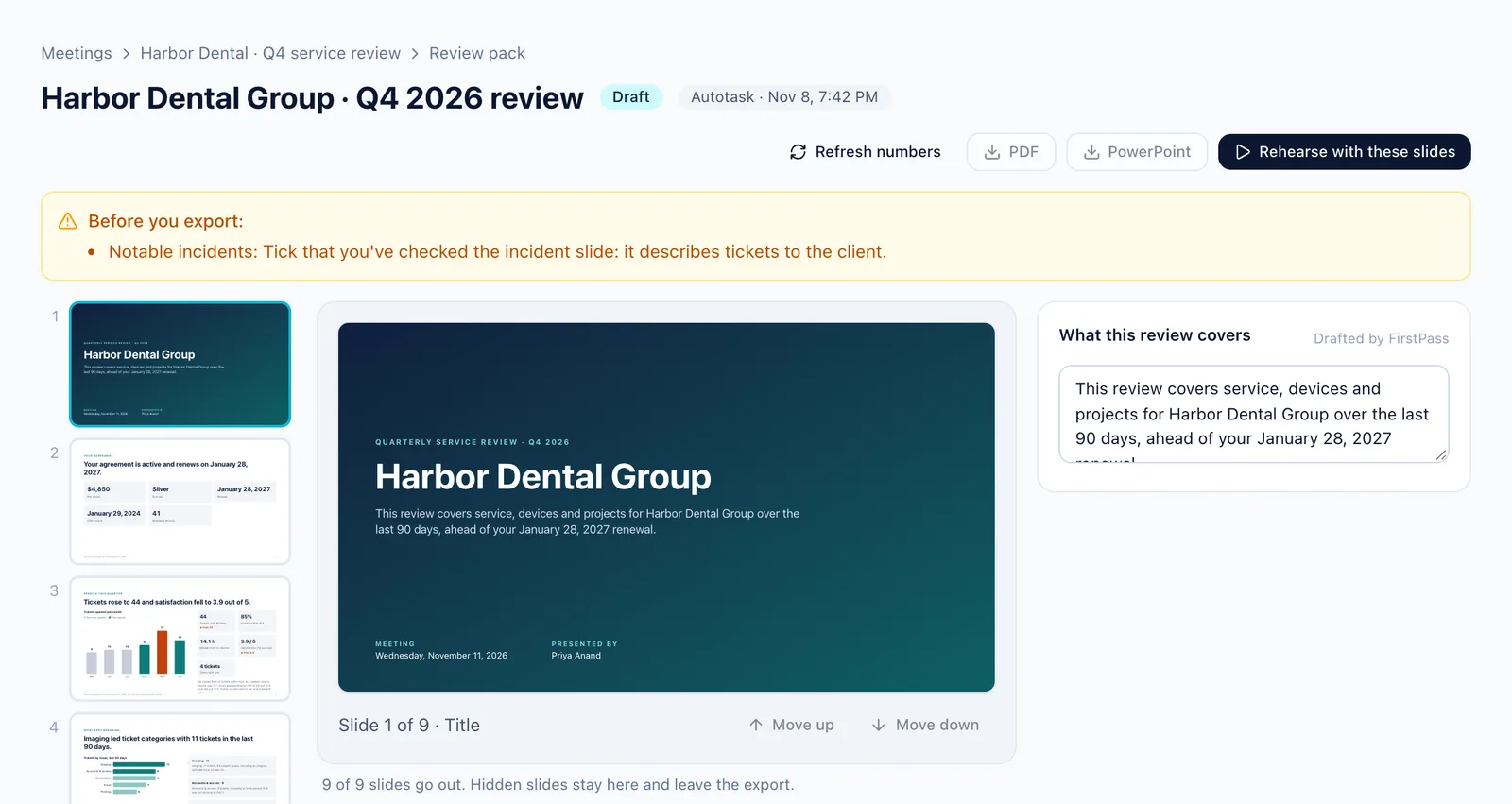
The agreement, the service you gave this quarter, what kept breaking, notable incidents, their environment, projects, recommendations and next steps. The numbers come straight from Autotask or ConnectWise and can’t be edited. Boxes marked Needs you are what only you know.
Export to PowerPoint or PDF.

✓
Built from the brief, so every line traces back to your CRM, your PSA, your last debrief or the web
✓
Nothing from people research goes into the email
✓
Hide, show and reorder slides; a slide the client has no data for is left out
✓
Ticket titles on the incident slide are cleaned of passwords and patient details, and you tick that you’ve read it before it goes out
✓
Rehearse with these slides: present the deck to a practice client for five minutes and get scored on it
✓
When your admin allows it, overdue invoices are named in your plan to raise after the meeting. They never go on a slide or in an email
✓
The agenda email and the call plan are on the phone too, on the brief’s screen
✓
Yours alone, like the brief they came from. The review pack is switched on per organization
app.myfirstpass.com/calls/deal-prep/research
The account review pack editor in FirstPass: slides down the side, PSA numbers that can’t be edited, boxes drafted by FirstPass and boxes marked Needs you

The review pack editor for a client of our demo MSP. The numbers come from its PSA.
app.myfirstpass.com/calls/deal-prep/research
A FirstPass call plan: the goal and the ask, the agenda, questions to ask, what they’ll push back on, and the rep’s own watch-out

A call plan for the same meeting: the ask, the watch-out and what stays out of the room.

Debrief

The call ends. The debrief is waiting.

When a rep’s recorded customer call is scored, FirstPass writes them a debrief: what happened, what’s new on the deal, and what to do next. A call matched to a meeting on their calendar gets the most from it, because FirstPass knows who was invited, what the brief said and which deal it’s on.
✓
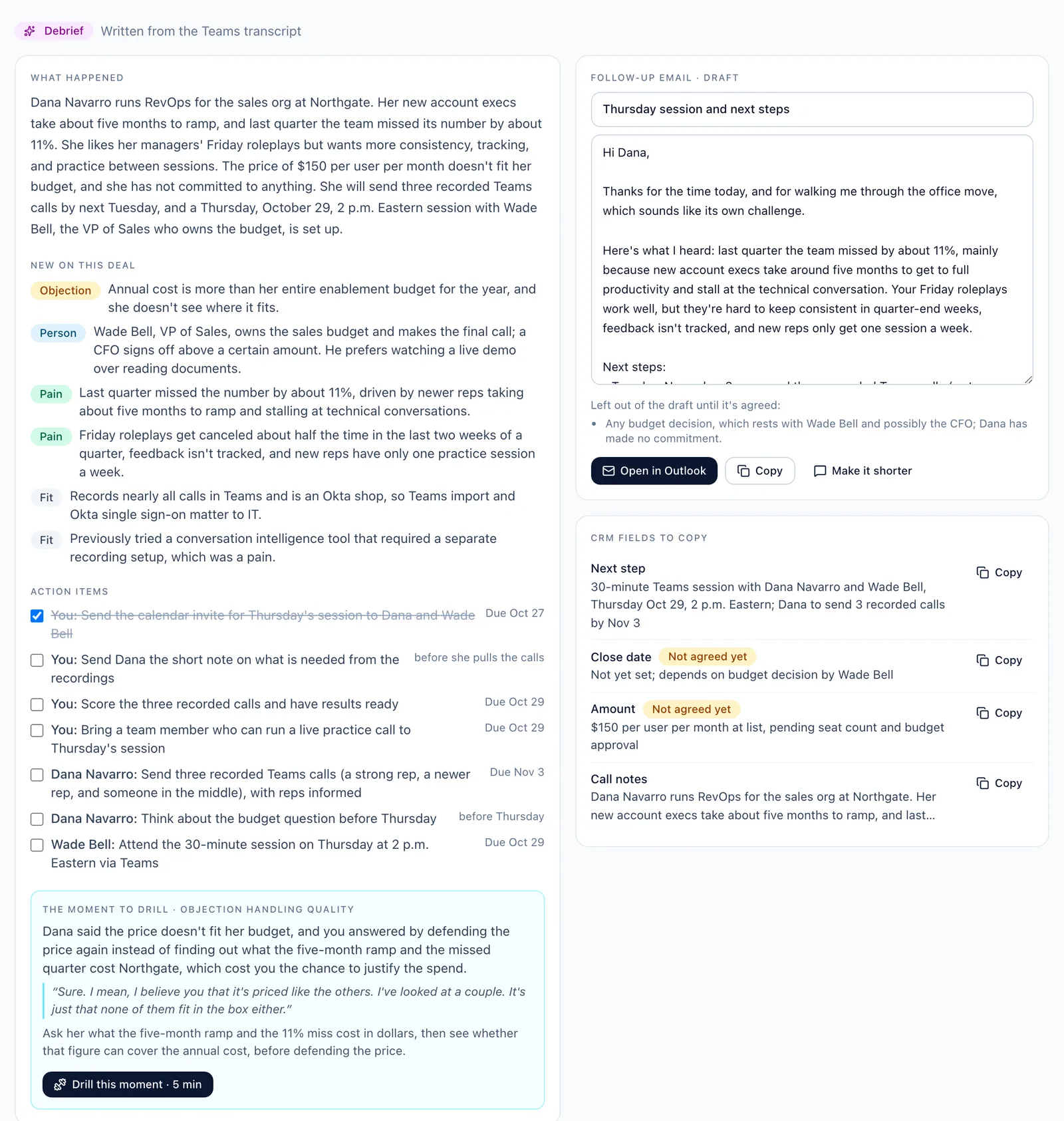
What happened: the call and what was agreed, in a few sentences
✓
New on this deal: objections, people and pains that weren’t in the brief or the CRM
✓
Action items, yours and the customer’s, with due dates when one was said
✓
The moment to drill, in the customer’s own words, re-run as a five-minute drill on that skill
✓
A follow-up email drafted to the people on the invite. Edit it, then open it in Outlook or Gmail. Anything that still needs approval, like a discount, is left out and listed
✓
CRM fields ready to copy: stage, next step, amount, close date and the call notes
✓
The next brief with that company starts from it
✓
An email when it’s ready, a notification on the phone, and a Slack message if your organization connects Slack. Only the rep sees their debriefs
✓
Read it on the phone too, from the notification
app.myfirstpass.com/live-calls
A call debrief in FirstPass: what happened, what’s new on the deal, action items, the moment to drill, a follow-up email draft and CRM fields to copy

A debrief on a sales call from our demo team, written from its Teams transcript.

Recommendations

A record of every recommendation, every promise, and every risk the client chose to keep.

On each recorded client call, FirstPass finds the recommendations you made and how the client answered, what each side promised, and what the client asked for. Nothing goes on the client’s record until a person confirms it. Built for MSPs, and switched on per organization.

✓
Every item quotes the call word for word, so you can see exactly what was said
✓
Confirm, edit, close or dismiss what a call found, and add anything it missed. Every change is kept in the item’s history
✓
A later call that answers an earlier recommendation updates it, and says which call it came from
✓
Confirm a promise and open an Autotask or ConnectWise ticket for it in one click, so it’s tracked where your team already works (when your PSA is connected and your organization turns tickets on)
✓
A promise that passes its due date without being done is marked missed
✓
A recommendation the client declines goes to them as a one-page risk acceptance form, from your company, on a link that needs no sign-in
✓
The client accepts the risk for now or asks for a quote, types their name and signs. Both sides get the signed copy as a PDF
✓
Each signed decision goes back to the person who signed it for review, every 90 days by default, so it never goes stale
✓
Managers see what was raised on their team’s calls and admins everyone’s; reps see their own calls’ items where your organization lets reps see their calls

The form records the client’s decision with a typed-name signature, their consent and the time. It doesn’t claim to remove liability.
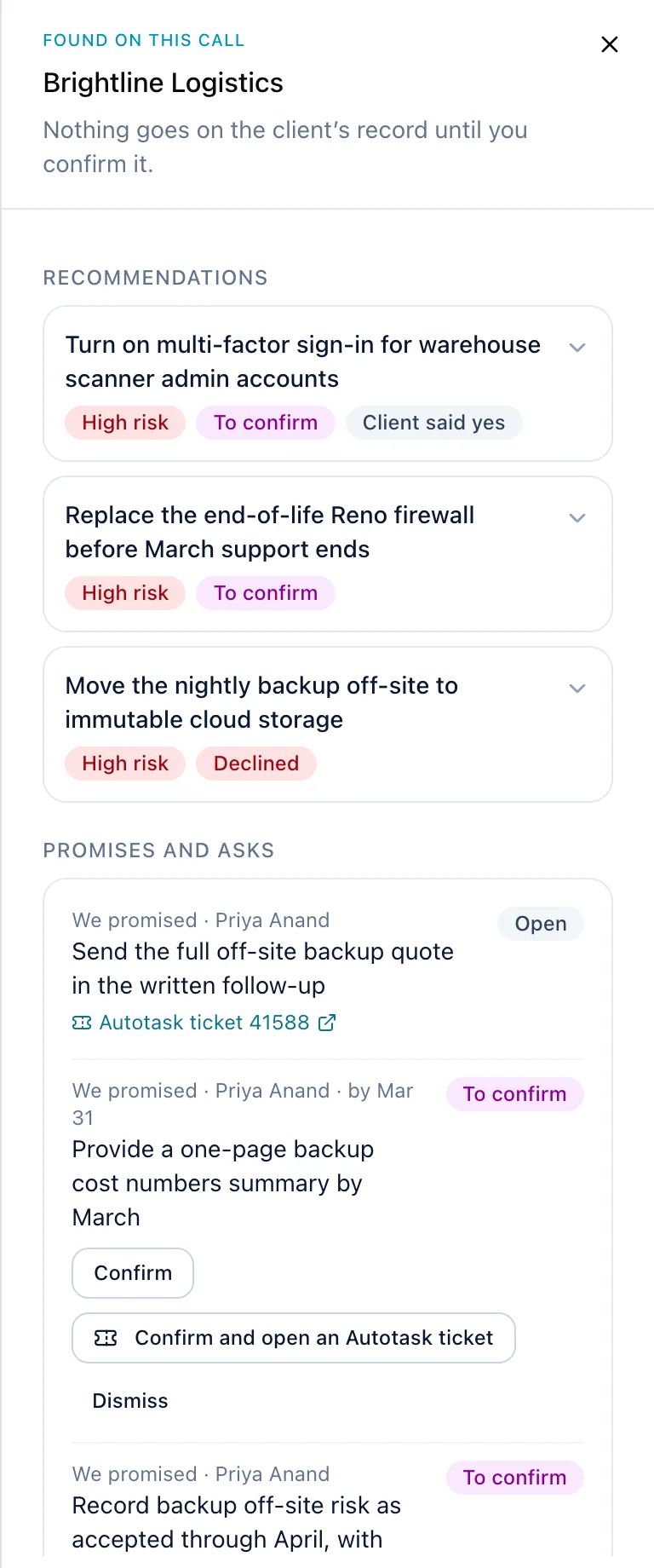
app.myfirstpass.com/live-calls
Recommendations found on a client call in FirstPass: each one with its risk, the client’s answer quoted from the call, and a button to confirm it

Found on a call with a client of our demo MSP, waiting for a person to confirm.
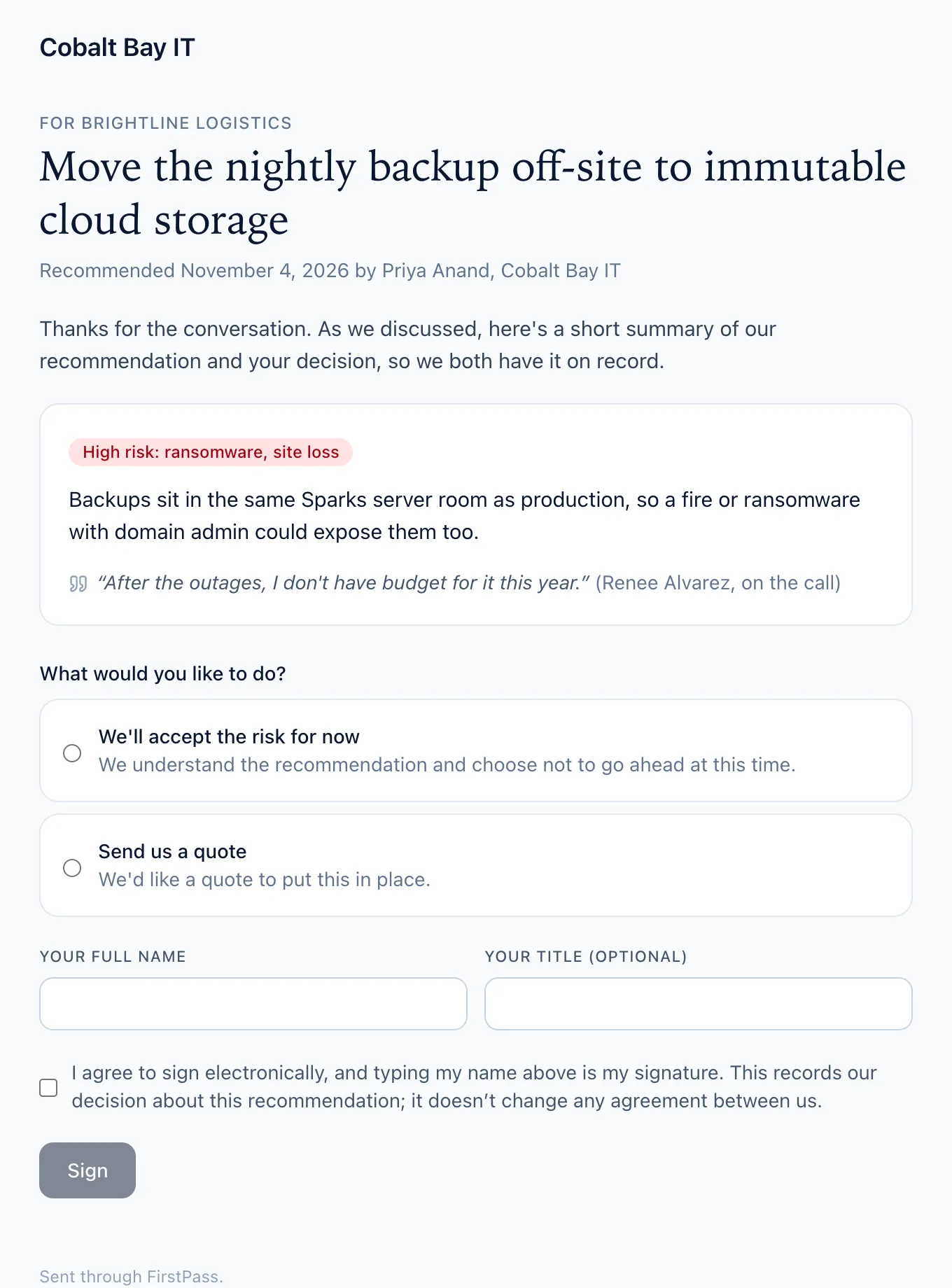
app.myfirstpass.com/sign
The client’s risk acceptance page: the recommendation, why it matters, the choice to accept the risk or ask for a quote, and a typed-name signature

What the client sees: one page, one decision, no account needed.

Walk into every customer meeting ready.

We’ll build a demo from one of your real accounts: the brief, the plan and the rehearsal.

Get a demo →